
Switching
How to Move From Featurebase Without Losing Votes or Comments
FeatQ imports your Featurebase posts, statuses, votes and comments through a Featurebase API key, and Featurebase lists API access on Growth and up (as of November 2026). Without API access, the requests CSV export (Settings > Data > Imports & Exports), which Featurebase's help center ties to a permission rather than a plan, brings your requests and vote counts, without comments or merged requests. Before you move, see FeatQ vs Featurebase, side by side.
FeatQ is our product, so weigh our view of it accordingly.
Checked against Featurebase's pricing page, its help center and our importer on November 7, 2026.
On this page
What you can take out of Featurebase
When you move a customer feedback board to a new vendor, three things matter: the requests, the people who voted on each one, and the comment thread underneath. That history is your user base's record of what they asked for. Lose the voters and every request starts from zero on the new board; lose the comments and the product manager loses the context behind each suggestion.
As of November 2026, Featurebase gives you three ways to get that customer data out:
- The requests CSV export. Go to Settings, Data, Imports & Exports and click Export Data. Per Featurebase's exporting requests article, the file covers every request in your workspace, not the filtered list you have open, and the download link expires after 24 hours. Its columns include the title, description, dates, link, author, category, labels, status, ETA, requester count, monthly spend, custom fields and linked Linear or Jira issues. It does not include comments or merged requests. The article names a permission to export, not a plan, so no plan limit is stated.
- The users and companies export. The users export article lets you export a view of your users or companies as a CSV or Excel file. Useful as your own record of who your customers are.
- The API. Featurebase's pricing page lists the API, MCP and webhooks on Growth, Professional and Enterprise, not on Free. The API reaches voters and comments, which the CSV leaves out.
So the plan you are on decides the path. On Growth or higher, use the API import and the votes and comments come with you. Without the API, the CSV is the way out, and it carries requests and vote counts only. If you are on a legacy plan from before December 4, 2025, Featurebase's pricing update note says you keep that pricing, so check whether your plan includes the API before you start.
Path A: API import (Growth and up)
- In Featurebase, open Settings, API and create a key, as the getting started with the API article describes. Name it after the move so it is easy to find and delete later.
- Open your FeatQ board admin, go to the Settings tab and scroll to Import.
- Choose the Featurebase tab, paste the key and load your boards.
- Pick one Featurebase board. Before anything is written, FeatQ shows how each of your Featurebase statuses will map. Then click Import.
The import runs in three phases: posts, then voters, then comments. While it runs you see the counts: new requests, new votes with an email, new comments, votes kept without an email, and what was skipped (closed posts, hidden posts, private comments). Compare those numbers with the totals in Featurebase before you switch anything. Nothing changes on the source side, so you keep collecting votes in Featurebase until the links move.
One run brings up to 2,000 requests, 20,000 votes and 10,000 comments, and stops after 10 minutes. If your backlog is larger than that, run the import again: FeatQ skips what it already has and adds the rest (each board can start 3 imports an hour). If the key can list posts but not voters, the votes come across as counts only, and the run says so.
Run it once per Featurebase board. Each FeatQ board is billed on its own, so count your Featurebase boards before you move; Featurebase allows 5 on Growth and 10 on Professional, per its pricing page (as of November 2026). Decide whether the FeatQ board is public or private before you import: a restricted Featurebase board can only go into a private FeatQ board. If your engineering team tracks requests through the linked Linear or Jira issues, note those links first, because they do not move. The full reference is the Featurebase import steps in the FeatQ docs.
Path B: CSV export (no API needed)
- In Featurebase, go to Settings, Data, Imports & Exports, click Export Data and save the file within 24 hours.
- If you run more than one board, the file holds requests from all of them. Filter on the Board Name column so each file holds one board, drop rows whose review state is in review, and remove posts you hid from your portal (the export has no column for that, so check them in Featurebase).
- In FeatQ, open the board admin, Settings, Import, and choose the CSV file tab.
- Upload the file. FeatQ guesses which column is which and shows a preview, so you can fix the column matching before anything is imported.
FeatQ can use seven columns: title, description, status, votes, created date, submitter email and an ID. Only the title is required. Map the request link as the ID, so a second run matches the same rows instead of creating duplicates and refreshes their vote counts. Each file can be up to 900 KB and 5,000 rows.
Two limits come from the format, not from either tool. A CSV has no individual voters, so the vote count arrives as a number and nobody is attached to it. And the export has no comments, so the discussion stays in Featurebase. If those threads matter, a short Growth subscription for the move and the API import is the way to keep them.
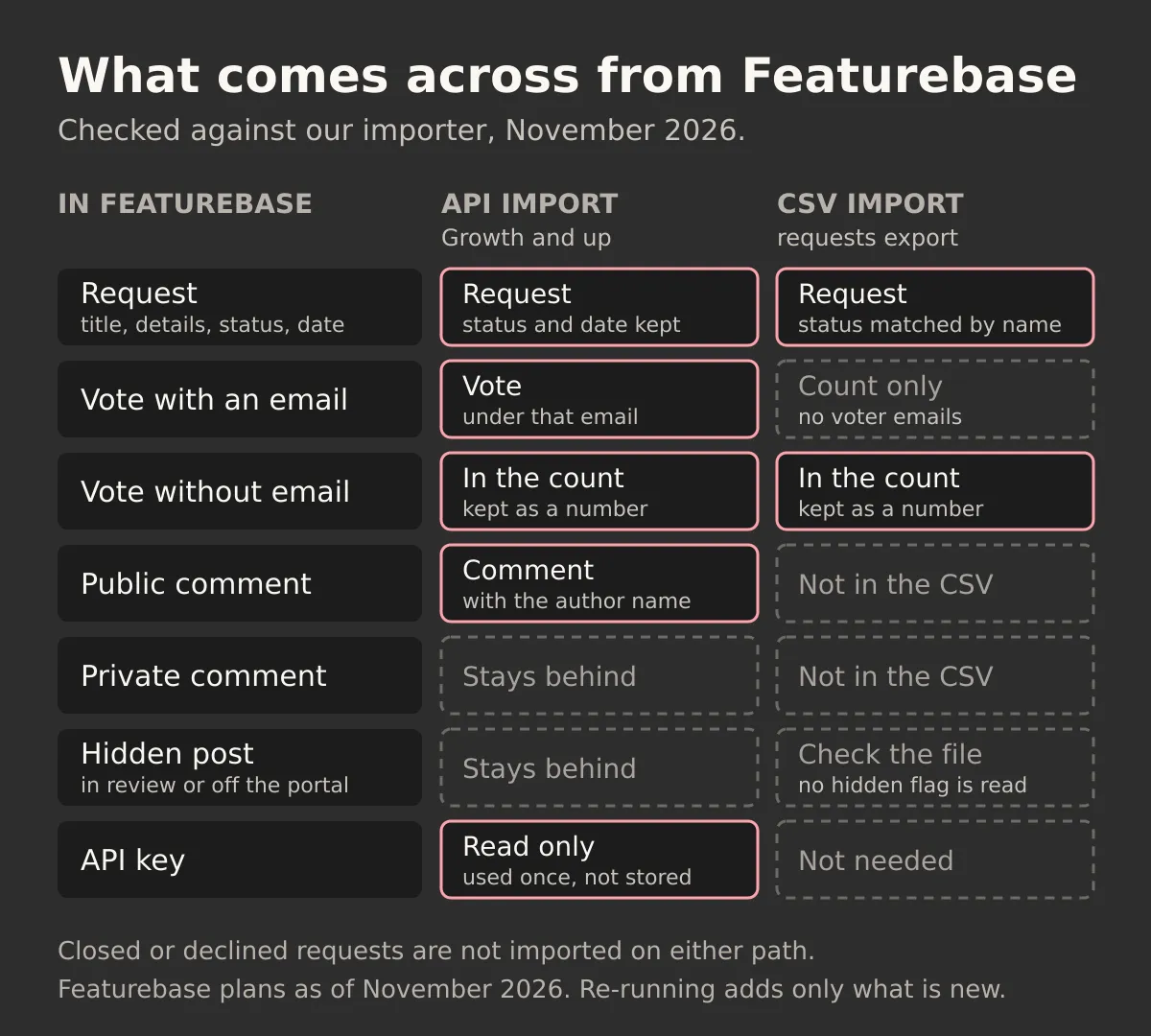
What comes across, and what stays behind
| In Featurebase | API import | CSV import |
|---|---|---|
| Post title and description | A request, HTML turned into plain text | A request, from the title and description columns |
| Status | Mapped by name, then by status type | Mapped by name only |
| Created date | The same created date | The same date, if the column is mapped |
| Vote from someone with an email | A vote under that email | Part of the vote count |
| Vote with no email | Kept in the vote count | Part of the vote count |
| Public comment | A comment with the author’s name | Not in the export |
| Private, deleted, spam or in-review comment | Not imported | Not in the export |
| Post in review, hidden from the portal or limited to some users | Not imported | Imported if it is in the file |
| Closed or declined post | Not imported | Not imported |
| Labels, ETA, monthly spend, custom fields, Linear or Jira links | Not imported | Not imported |
Statuses are matched by name, ignoring case: "Under review" becomes Considering, "Shipped" or "Released" become Shipped. With the API, a custom name FeatQ does not know falls back to the Featurebase status type: reviewing becomes Considering, unstarted becomes Planned (or New for your default status), active becomes In progress, completed becomes Shipped, and canceled is skipped. A CSV has only the name, so an unknown name lands in New. Check those after the run.
Closed and declined posts stay behind because FeatQ has no declined status: a request is new, considering, planned, in progress or shipped. The same goes for posts still in review or hidden from your portal, since importing them would publish them on the new board.
Much of Featurebase does not move, because FeatQ has no match for it. Featurebase is now an all-in-one support suite: per its pricing page (as of November 2026), one subscription covers a help desk with an inbox, ticketing and live chat, the Fibi AI Agent, a help center, outbound messages and changelog updates, surveys and reporting. Support tickets, conversations, help center articles, survey results such as NPS and CSAT, and reports stay where they are. Featurebase also lists integrations with Slack, Intercom, Zendesk, Linear, Jira, ClickUp, GitHub, Zapier and Segment on Growth and up, and HubSpot and Salesforce on Professional and Enterprise. FeatQ is a feedback board, a public roadmap and a changelog. If your support team runs its daily workflow from that inbox, you may keep Featurebase for support and move only the feature requests, or decide the move is not worth it.
The API key and your security
Featurebase's API article says it plainly: "An API key has full access to your workspace" (as of November 2026). Assume the key you paste could change anything in that workspace. Treat it like an admin password.
Here is what FeatQ does with it:
- It only reads. The importer sends read requests only and refuses to send anything else, so nothing in your Featurebase account changes.
- It uses the key for that one import and never stores it or writes it to a log.
- It cannot connect to Featurebase again later. To import again, you paste a key again.
Even so, the safest key is one that no longer exists. Create a key just for the move, run the import, then delete it under Settings, API. If you run a second import a week later, create a fresh one.
For comparison, Featurebase's own MCP server, available on all paid plans, signs AI tools in as a teammate, and they inherit that teammate's permissions. That can be narrower than a workspace key, but the importer reads through the API, so a key is what it needs.
What happens to your voters
With the API import, your voters keep their votes. A Featurebase vote from someone with an email becomes a FeatQ vote under that email, so the ranking on the new board matches the old one. If the same person votes on FeatQ later with the same email, it does not count twice. Votes without an email stay in the request's total.
With a CSV, every request keeps its total, but no individual voter comes along. The ranking still holds; the list of who to tell when a request ships does not.
Either way, imported voters get no FeatQ emails. Status emails are off for them because they never signed up for email from FeatQ, and the import sends no webhooks. On the new board anyone can submit a request or vote with just an email and no account, and new votes come with an opt-in box for status emails, so people who vote again choose for themselves.
That means you announce the move. If your Featurebase plan includes changelog updates, a last post there is the natural place. Your own email list, an in-app notice and your support replies work too. Then post the move as the first release note on your FeatQ changelog. After that the feedback loop works as before: when a request ships, voters who opted in get an email.
A checklist before you cancel Featurebase
- Keep an archive. Download the requests CSV and the users and companies export, even if you used the API. The CSV keeps columns FeatQ does not import, such as labels (your tags), ETA and monthly spend.
- Import and compare. Requests should equal Featurebase posts minus closed and hidden ones, and vote totals should match.
- Check the statuses. Look at anything that landed in New and move it.
- Delete the API key. Settings, API, in Featurebase.
- Swap the links. Replace the portal URL and the in-app widget in your product, your help center, docs and saved support replies, and point other channels where customers leave suggestions and bug reports, such as a forum or GitHub issues, to the new board.
- Run the import once more. Right after the switch, catch anything added in between. It adds only what is new.
- Check your Featurebase plan. Featurebase has priced by the seat since December 2025, and customers who joined before December 4, 2025 keep their legacy pricing, per its pricing update note. If you also use the help desk, cancelling ends that too; if you only drop feedback teammates, the seats article explains who still needs one. If you are paying for Growth only for the API, cancel after the final import run.
Most of the work is the link swap and the announcement, not the import. FeatQ is $19 a month per board for the first 25 boards, then $29 a month for new boards. Invite unlimited teammates to each board at no extra cost. Its limits are real: board alerts go to Slack or Discord, and there is no help desk, no Jira, Linear or CRM integration, no SSO and no AI triage. Each board has its own MCP server, so a coding agent can pick up the top request and read it as a spec.
If you are still comparing, our Featurebase pricing and plan limits shows what each plan includes, the longer list of Featurebase alternatives covers other tools, and Canny vs Featurebase, head to head covers the most common two-way choice.