
Switching
How to Move From Canny Without Losing Votes or Comments
FeatQ imports your Canny posts, statuses, votes (with each voter's email) and comments through your Canny API key, up to 2,000 requests per run. Private comments and closed posts stay behind. Before you move, see Canny vs FeatQ, side by side.
FeatQ is our product, so weigh our view of it accordingly.
Checked against Canny's help center and our importer on November 7, 2026.
On this page
What you can take out of Canny
Before the mechanics, decide what has to survive the move. For most product teams it is three things: the requests, who asked for each one, and the conversation underneath. That history is your user base's record of what they asked for, and it keeps prioritization honest on the new board.
As of November 2026, Canny gives you three ways to get your feedback data out:
- A CSV from the Ideas dashboard. Right-click a view in the left sidebar and click Export view. Per Canny's exporting feedback article, the file holds your ideas and their data, but insight detail such as individual notes and source URLs is not included.
- The classic board export. In the classic view, Settings, Boards, Export Data gives one CSV per board with the title, details, vote score, comment count, status, tags, author, owner and associated MRR. You can also export the voter list of one post at a time. Canny says this view is being phased out and is not on every account.
- The API. Canny's help center says the API is available to accounts on all plans, and it reaches posts, votes, comments, users and companies.
Exporting comments from the dashboard needs the Business plan, per Canny's comments article. So a CSV gives you titles, statuses and vote totals, while the voters and the discussion sit behind the API. That is the gap most moves fall into: the requests arrive, but nobody who voted is attached to them.
FeatQ's importer reads the API, so it works on any Canny plan. If all you want is an archive, the CSV is enough. If you want your customers to keep their votes and their comments on the new board, use the API import below.
Step 1: Copy your Canny API key
In Canny, open your settings, go to the API section and copy the secret API key. Canny's API article lists what the key reaches: boards, posts, votes, comments, users, companies, tags and more. For security, treat it like a password and paste it only into the importer.
FeatQ uses the key for that one import and does not store it, so it cannot connect to your Canny account again later. It only reads from Canny; nothing on your Canny board changes, so you keep collecting votes there until you switch the links.
If the Canny board is private, make your FeatQ board private first. A private Canny board can only be imported into a private FeatQ board.
Step 2: Pick the board and run the import
- Open your FeatQ board admin, go to the Settings tab and scroll to Import.
- Choose the Canny tab, paste the key and click Load boards.
- The list shows each Canny board with its post count and marks the private ones. Pick one and click Import.
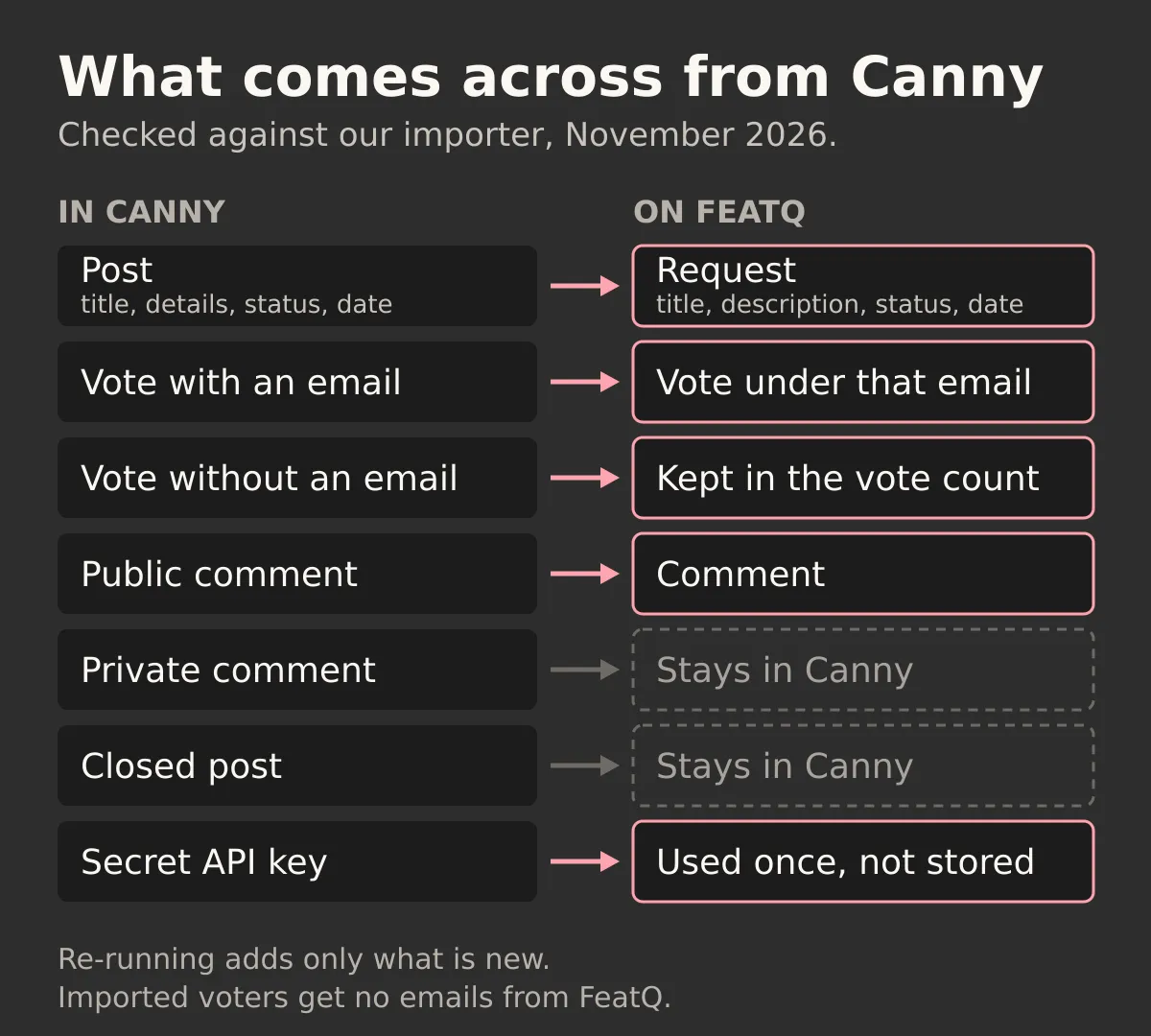
The import runs in three phases: posts, then votes, then comments. While it runs you see the counts: new requests, new votes with an email, new comments, votes kept without an email, closed posts skipped and private comments skipped. Those numbers are your first check against the totals in Canny.
One run brings up to 2,000 requests, 20,000 votes and 10,000 comments, and stops after 10 minutes. If a large board stops early, run the import again: FeatQ skips what it already has and picks up the rest (each board can start 3 imports an hour). Run it once per Canny board. Each FeatQ board is billed on its own, so count your Canny boards before you move. The full reference is the Canny import steps in the docs.
What comes across, and what stays behind
| In Canny | On FeatQ |
|---|---|
| Post title and details | A request with the same title and description |
| Status: open, under review, planned, in progress, complete | New, Considering, Planned, In progress, Shipped |
| Created date | The same created date |
| Vote from someone with an email | A vote under that email |
| Vote with no email | Kept in the request’s vote count |
| Public comment | A comment |
| Internal or private comment | Not imported |
| Closed post | Not imported |
| Tags, categories, owner, associated MRR | Not imported |
Statuses are matched by name, ignoring case. Canny's custom statuses, which its public roadmap article puts on Pro and Business, map the same way when their names are close to FeatQ's: "Shipped" or "Released" become Shipped, "Accepted" becomes Planned. A name FeatQ does not recognise lands in New, so check those after the run.
Closed posts stay behind because FeatQ has no declined status: a request is new, considering, planned, in progress or shipped. If your Canny board hides comments from users and your FeatQ board is public, no comments are imported at all.
Some Canny features have no FeatQ match and do not move. As of November 2026, Canny's pricing page lists automatic feedback capture from customer support tools such as Intercom and Zendesk, issue links to Jira, Linear, ClickUp and other trackers on Pro and up, and HubSpot and Salesforce on Business. Insight notes and changelog entries stay behind too. FeatQ is a board, a public roadmap and a changelog. If your workflow depends on those integrations, that is a reason to stay on Canny or pick a tool that has them.
What happens to your voters
Your voters keep their votes. A Canny vote from someone with an email becomes a FeatQ vote under that email, so the order of priority on the new board matches the old one. If the same person votes on FeatQ later with the same email, the vote does not count twice. Votes without an email stay in the request's vote total.
Imported voters get no FeatQ emails. Status emails are off for them because they never signed up for email from FeatQ, and the import sends no webhooks. On the new board anyone can submit a request or vote with just an email and no account, so there is little learning curve for them. New votes on FeatQ come with an opt-in box for status emails, so people who vote on the new board choose for themselves.
That means you tell people about the move yourself. On Canny, changelog emails to end users need a Pro or Business plan: Canny's billing plans article says they are not sent on the Free plan (as of November 2026). Otherwise use your own email list, an in-app notice or your support replies.
Pointing people to the new board
Customers find a feedback board through links, so the move is mostly a link swap. Put the new board URL everywhere the old one lived:
- the feedback link or widget inside your product;
- your help center, documentation and README;
- saved replies your support team uses for feature requests;
- a final post on the Canny board that points to the new one.
Also check every other channel where customers leave suggestions, such as a forum, GitHub issues or app reviews, and point them to the same public feedback board.
Then publish the move on the new changelog. Your public roadmap and changelog on FeatQ fill from the imported statuses, so planned and in-progress work is visible on day one, and the feedback loop keeps working: when a request ships, its voters who opted in hear about it. If you use a coding agent, every FeatQ board has its own MCP server, so the agent can pick up the top request and read it as a spec.
If you are still choosing where to move, our shortlist of Canny alternatives is a pricing comparison of seven tools, and Canny vs Featurebase compared covers the most common two-way choice.
A checklist before you cancel Canny
- Keep an archive. Export a CSV of each Ideas view. If you are on Business and want the comments in a file too, export those separately.
- Import and compare. Run the import for each board and check the counts: requests should equal Canny posts minus closed ones, and vote totals should match.
- Check the statuses. Look at anything that landed in New and move it to the right status.
- Swap the links. Product, docs, support replies and the old board.
- Run the import once more. Right after the switch, run it again to catch posts and votes added in between. It adds only what is new.
- Watch the Canny bill until you cancel. Canny's pricing metric is the tracked user: anyone who posted, voted or commented. The count does not reset each month, and its pricing page says Canny will upgrade you to the next tier automatically once you pass your limit, unless you set a monthly spend limit, in which case Canny stops tracking new users instead. Details are in the tracked user article.
- Check a legacy plan first. Canny grandfathers Starter and Growth customers who signed up before May 9, 2025, per its billing plans article. If that is you, ask Canny what cancelling means for that price before you do it.
Most of the work is the link swap and the announcement, not the import. FeatQ is $19 a month per board for the first 25 boards, then $29 a month for new boards. Invite unlimited teammates to each board at no extra cost. Its integrations are limited: board alerts go to Slack or Discord, and there is no Jira, Linear or CRM integration, no SSO and no AI triage. If your development team works from Jira tickets, check that list against what you use on Canny today.